Role
30The title against your target roles, in the tiers you defined. A dealbreaker title zeroes the whole score.
Job Seeker OS in your browser
The extension does two jobs. It reads the posting you are looking at and scores it against your own rules, and when you decide to apply, it fills the application form from your profile. You review everything, and you press Submit yourself.
Open a posting, click once, and get a 0 to 100 score with a verdict and the full breakdown of why. The score comes from rules you set, so the same job scores the same every time.
How scoring works Job twoOn the application page, the extension matches the form's fields to your saved data and shows you the full list to review. It fills what you approve and never presses Submit.
How autofill worksDedicated readers understand LinkedIn, Greenhouse, Lever, Glassdoor, justjoin.it, and Eightfold career portals; everywhere else the extension looks for the standard job data most career pages publish. It pulls the company, role, location, work mode, salary, and the full description, formatting preserved. Nothing is read until you open the panel on that page.
Score this opportunity sends the captured posting to your account, where a deterministic rules engine scores it. Not an AI impression: the same posting against the same rules gives the same number, in the extension or in the web app's paste bar.
A 0 to 100 score, a tier verdict, a one-line rationale, and the per-dimension breakdown with the exact keywords and catalog evidence that matched. Any dealbreaker, like a refused industry or an unacceptable location, forces the score to zero no matter what else matched.
Score tab on a live posting
The posting stays on the left. The verdict, breakdown, and matched signals sit beside it.

Five weighted ingredients add up to 100. The weights below are the defaults; the roles, keywords, locations, and dealbreakers inside each one are yours, defined once in your scoring rules and applied to every posting the same way.
The title against your target roles, in the tiers you defined. A dealbreaker title zeroes the whole score.
Location and work mode against what you accept. A reject phrase, like an office you will not commute to, is a dealbreaker.
The keywords that signal the kind of work you want, counted across the full description.
Industries you prefer add points. Industries you refuse zero the score.
Evidence from your own work history: how many of your skills and case tags the posting actually mentions.
The verdict bands (defaults, tunable)
Scoring saves the posting as an opportunity in the web app: the full description, the score with its breakdown and reasoning, and the source link. Re-score after tuning your rules and the history is kept. From there you tailor a resume, find a contact, and work the lead; the extension is the capture point, the workspace is where it converges.
Capture before the score
What was read from the page is shown first, so you can see exactly what will be scored.

The review step
Every field is a row you can uncheck or edit. Nothing is written until you confirm.
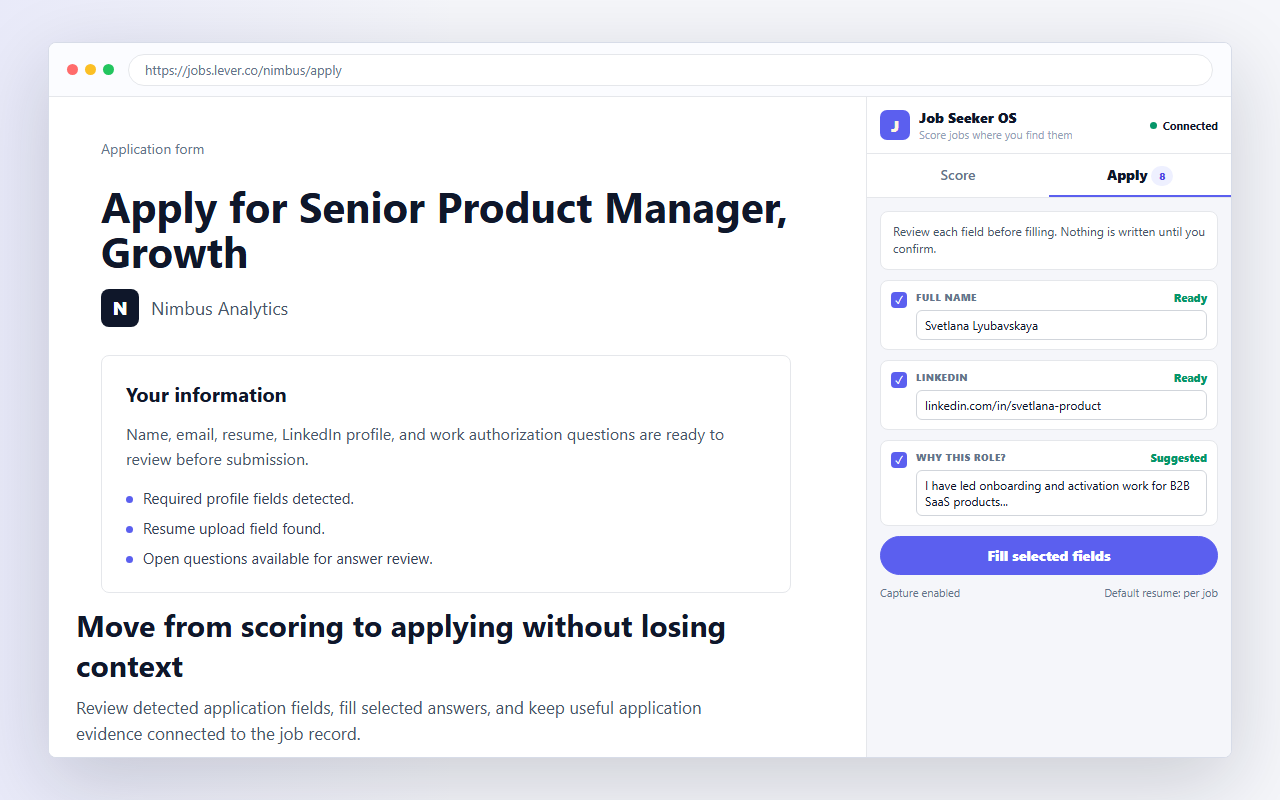
Greenhouse, Lever, and Workday forms are recognized directly, Workday one step at a time. Other application forms are detected by their shape. Login and password screens are never treated as forms.
The extension reads each field's label and standard hints and maps it to your saved data. There is no AI deciding what to write: a field either matches something you saved or it is left for you.
Confident matches come pre-checked, weaker suggestions are opt-in, and every value is editable in place. Fields with no saved data are listed too, so you know what is left. Fill selected fields writes only what you approved.
After filling, the panel reminds you to review the page itself. The extension has no submit action anywhere in its code path.
Name, email, phone, location, links, current title, years of experience. Factual fields only.
The answers every form asks for: work authorization, sponsorship, notice period, salary expectation, relocation.
The resume you picked for this job, attached as a PDF to the upload field.
Open questions you have answered before are recognized and pre-filled with your saved answer.
An application sent in your name should be under your control at every step. These rules are built into the extension, not settings you have to find.
Autofill writes values into fields and stops. The submit button is always yours to click, on every site, every time.
Demographic and EEO questions, date of birth, government IDs, and payment details are detected and never filled. They stay untouched on the page.
Every value comes from data you saved: your profile, your defaults, your answer bank. There is no generated prose and no AI guessing on your behalf.
Filling needs your confirmation, and saving answers back needs it again. Unchecked means untouched.
The full data story is in the privacy policy, including exactly what the extension reads and stores.
After a form, the extension can show what you typed that it did not already know: a new open question, a changed phone number, a notice period. You check what is worth keeping and it goes to your answer bank or profile. The next form that asks the same question comes pre-filled with your own words, and every application makes the following one faster.
Install the extension, connect your Job Seeker OS account, and the next job you open comes with a verdict, and the next application comes half filled.